Setting Up Microsoft Authenticator
To install Authenticator on your iOS device
Scan the QR code

Or download and install Authenticator from the Apple app store.
To install Authenticator on your Android device
Scan the QR code

Or download and install Authenticator from the Google Play store.
Upon first install you will have to agree to Microsoft privacy policy and it's required permissions.
Add a work or school account using a QR code
To add an account by scanning a QR Code, do the following from your computer:
-
Sign in to the Security info page of your account at mysignins.microsoft.com/security-info.
-
Select
 Add sign-in method.
-
Choose Microsoft Authenticator from the dropdown and select Add.

-
If you already have Authenticator installed on your phone, select Next to display a QR code.
-
Open Authenticator on your phone and select the plus icon
and select Add account.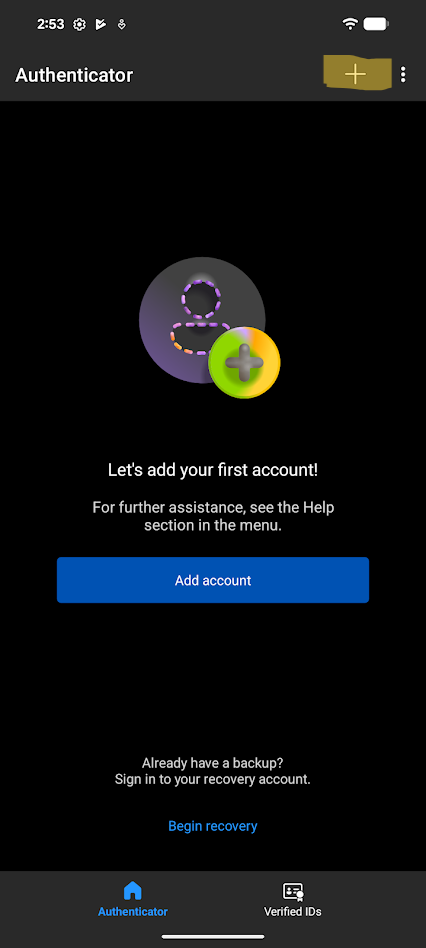
-
Select Work or school account then tap Scan a QR Code.
- Your account is now added to Microsoft Authenticator
Add a work or school account using your credentials
To add an account by signing into your work or school account using your credentials:
-
Open Authenticator and select the plus icon
on the top menu bar.
-
Tap Work or school account and select Sign in.

 If your phone already has Microsoft accounts configured, select your QldBar account. Otherwise, tap Use another account.
 -
Enter your ****@qldbar.asn.au email address and password
Complete the existing SMS verification process by selecting Text and entering the code sent to your mobile phone. - When greeted with the Let's secure your account tap Continue

-
You may be prompted to create a passkey. A passkey allows you to sign in using your device PIN, fingerprint, or facial recognition instead of a password or text message code. The passkey remains on your device and is not shared with Barweb. You can choose Skip for now if you do not wish to create a passkey at this time.
 If prompted to register the device you can tap skip as well
 -
You should now have your QldBar account added to your authenticator app.
